Just ask. We act.

DBSynth · Data access platform

Development completed · market implementation

Give applications and users controlled access to core-system data.

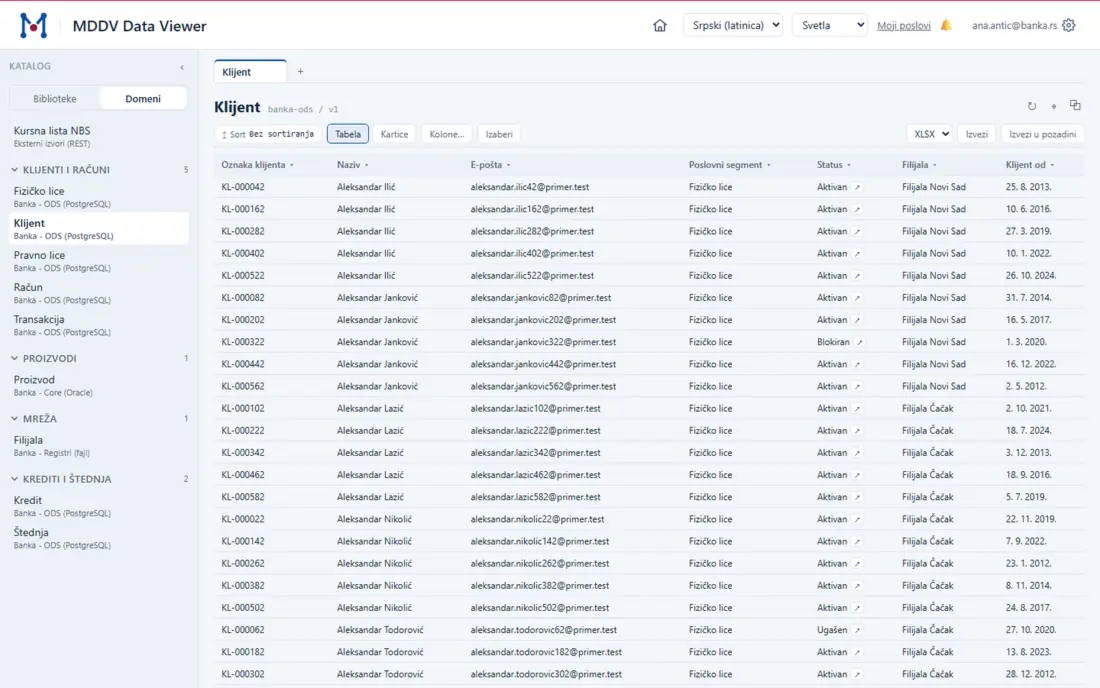
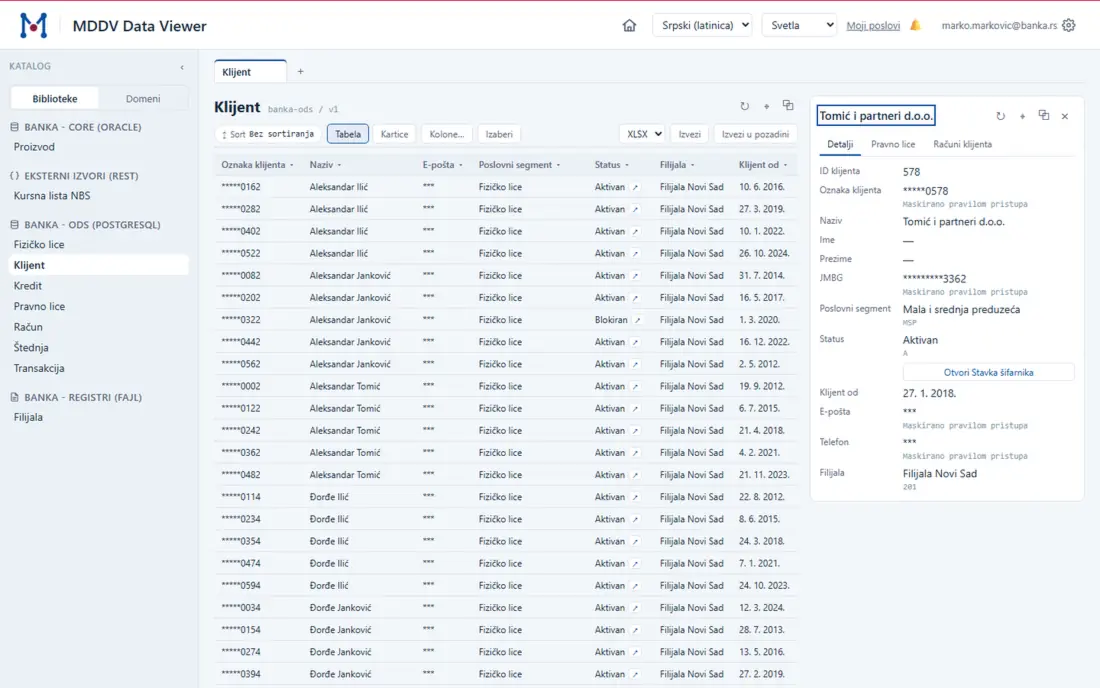
DBSynth combines a near real-time PostgreSQL operational data store with configurable APIs, central access rules with an audit trail, and a central activity log. It runs in the client’s environment, uses the existing identity provider and leaves the core system unchanged.

One controlled path from core data to its consumers

ODSNear real-time data MDDVAPI and web access CAMAccess rights LogSinkActivity log

Explore the architecture

See how each change and read request moves through the platform.

Explore the diagram. On touch screens, swipe to see more.

DBSynth architecture Changes in the core system are captured and streamed through Kafka into a PostgreSQL operational data store (ODS). MDDV reads the ODS through CAM, which enforces access rights, and serves the data as a REST API and a web application. LogSink records activity from the ODS process, CAM and MDDV. User identity comes from Windows Active Directory or OAuth2. SOURCE DATA FOUNDATION · BUILT WITH THE CLIENT PERIKLE PRODUCTS CONSUMERS Core system System of record STAYS UNCHANGED change capture Kafka Change stream continuous ODS PostgreSQL operational data store NEAR REAL-TIME REPLICA CAM Access rights which rows which fields EVERY READ MDDV Data API REST Data Viewer Web application Applications and integrations Business users in the browser replication activity activity events sign-in LogSink Activity log: what each component did, searchable by request. The audit trail of access decisions is kept by CAM. PERIKLE PRODUCT External identity Windows (Active Directory) OAuth2

Overview

Each change follows one outbound path. Every platform read is controlled.

Changes flow from the core system into the ODS. Applications and people read through MDDV. CAM limits each request to permitted rows and fields. CAM keeps the audit trail of the decision; LogSink keeps the activity log.

The problem and the change

One core system. Many consumers of its data.

The same pattern appears wherever one central system holds the data that many others need. It is not specific to banking.

Core system LOAD AND RISK ONE OUTBOUND STREAM Reporting Internal applications Integrations Analysts Data extracts own access path own rules, no common trail DBSynth ODS · near real-time data MDDV · API and application CAM · access rights LogSink · activity trail
  • Reporting and ad hoc queries compete with transactions on the core database.
  • Every new consumer gets its own extract, interface or custom development.
  • Access rules are decided separately in each application.
  • No uniform answer to who read which data, and when.
  • Read workloads run on the ODS. The core handles its own processing.
  • New data resources can usually be exposed through configuration instead of custom service development.
  • Access rights are managed in one place and applied to every read.
  • One audit trail of access decisions, and one searchable activity log for operations.

A practical starting point

Map the current data-access paths around your core system.

We can identify the highest-load consumers, duplicated interfaces and access-control gaps before defining a target architecture.

Discuss your architecture

Where DBSynth applies

Four situations the platform is built for.

The pattern is the same each time: data that many need, read through one controlled path. The components differ per case.

01 · Operational reads

Reporting, applications and integrations read the ODS, not the core.

Every consumer gets a current copy of core data through one API and one application. The core handles its own transactions and nothing else.

  • ODS
  • MDDV
  • CAM
  • LogSink

03 · Auditors, regulators and partners

Controlled read access to defined entities, with a trail.

Reviewers inside and outside the organisation get exactly the entities, rows and fields they are entitled to, through the application or the API. Export is separately permitted. Every access is recorded.

  • MDDV
  • CAM
  • LogSink

04 · Back-office screens

Lookups, investigations and data checks without development.

A table or view that needs a screen gets one from configuration: search, detail, related records and export, under the same rights as everything else.

  • MDDV
  • CAM

Questions answered

Questions the platform answers.

How does data leave the core system?

Each change is captured once and sent through one controlled outbound stream into the ODS. Consumers do not connect to the core database.

Answered by ODS

How do applications read the data?

Through a versioned, documented REST API. New resources are added in configuration.

Answered by MDDV

How do people read the data?

In a web application with search, list, detail and export over the same resources. No per-screen development.

Answered by MDDV

Who may see which data?

Rights are defined centrally, down to rows and fields. Users sign in with Windows (Active Directory) or OAuth2.

Answered by CAM

Who accessed which data, and when?

Activity across the platform is recorded centrally and can be searched.

Answered by LogSink

What happens to data from systems that are retired?

It is migrated once into one current platform and published read-only through MDDV, with CAM rights and a LogSink trail. The old platform can be switched off.

Answered by MDDV, CAM and LogSink

Engagement

From assessment to a running platform.

Four delivery steps, with commercial and deployment details available below.

  1. Assess

    The core system, the data that consumers need, and the current access paths.

  2. Build the ODS together

    Replication is designed, installed and configured jointly with the client's team.

  3. Add the products

    MDDV, CAM and LogSink are installed on the client's infrastructure and connected to the ODS.

  4. Configure and hand over

    Resources, screens and access rights are configured. Data, credentials and configuration remain with the client.

Licensing Commercial model and source access
MDDV, CAM, LogSink
Commercial, source-available license. Source code is provided to licensees for inspection, audit, build and operation.
ODS
No product license. PostgreSQL and Kafka are open-source. The ODS is a consulting engagement.
Terms
Scope, term, number of deployments and support level are set in the commercial agreement.
Deployment Client environment and supported profiles
Location
The client’s own infrastructure. Data, credentials and configuration remain inside the client’s environment.
ODS
Designed per client. The reference design runs PostgreSQL and Kafka on the client's Kubernetes cluster, on premises.
MDDV
Docker on Linux or Kubernetes with OAuth2 sign-in, directly or behind an API gateway. On Windows, a process behind IIS with Windows integrated sign-in.
CAM
Kubernetes, or a single Docker host. A basic profile, or a high-availability profile with a message broker and a separate audit database.
LogSink
Kubernetes, or a single Docker host. Works without Kafka, or over Kafka where it is already operated.

Contact

Discuss a DBSynth assessment.

A short description of the core system and the data consumers is enough to start.

ask@perikle.com